Showing posts with label Html second tutorial. Show all posts

Friday, 18 September 2015

Comments in a webpage, Html second tutorial, HTML tutorial,

Comments in a webpage, Html second tutorial, HTML tutorial,

Assalam o alaikum Friends how are you all?

I am here with next part of HTML. and hope you people Like our previous work.

Comments in a webpage.

when you are write some code in html text editor and you want to explain that chunk of code are you want to add  reminder with that code. but you people doesnt want to show that explanation/reminder text on your webpage For that  purpose HTML provide some spacial code with use of that spacial code your remarks not shown with your webpage. and stored in your Html notepad file.
That coding is below.

<!-- Navigation starts here -->

example: 

onlineComputercafe.blogspot.com <!-- Tutorials blog -->

The red text in between  <!-- and --> is the comments text.


Ok Friends this was the html tutorial hope you people like it. stay with us for next tutorial. you can contact me through email: computercafe92@gmail.com


Dear Readers if you have any query/question feel free to ask me via comment box given below. Also Follow us on social media site and share that post with your friends. - See more at: http://onlinecomputercafe.blogspot.com
Tuesday, 4 August 2015

Fonts styles and attributes, Html second tutorial, HTML tutorial,

Hello friends how are you.

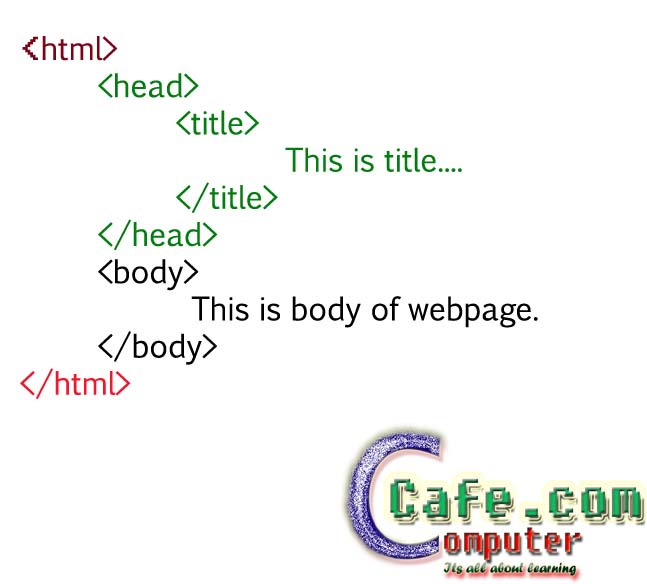
In first tutorial you learn about what is html and basic code. In this tutorial i am going to define that code and told about each and every tag.


Html second tutorial, HTML tutorial,


ok friends now i am going to define above code.


<HTML> is opening tag of HTML page. tags are written in between these <> braces.
HTML hyper text markup language told to text editor that this is html file.

Note : when you open a tag then you have to close that tag. so  </html> this is closing tag.

<HEAD> this is head of the website. in head we define title of the website page which shows on the title bar. in HEAD we write <TITLE> tag and write title in it then close it. </title></head> is closing tags of it. so when you open a tag you have to close it immediatly.


<BODY> this tag define the body of a webpage. what you want to show on your webpage you have to write in this tag. you have to write all html code in this tag. and what you write in this tag it show on your webpage.


NOTE : you have to save all your work with html extention. and after that goto that location and double click on save file and see the result.


ok friends this is what i told to you about basic HTML coding.

now come to our second tutorial.

How to bold the text?

if you want to show the text bold then use <b> tag. </b> is closing tag. write the message which you want to show bold between opening and  closing tags.

Example

<body>
Welcome on <b>onlinecomputercafe</b>.blogspot.com
</body>

It shows the below result.
Welcome on onlinecomputercafe.blogspot.com


Note: Always remember on which text you want to apply changes write that text in between the opening and closing tags.

ok Friends its enough for second tutorial see you in next tutorial.  For more tutorials www.onlinecomputercafe.blogspot.com


Dear Readers if you have any query/question feel free to ask me via comment box given below. Also Follow us on social media site and share that post with your friends. - See more at: http://onlinecomputercafe.blogspot.com

LinkWithin